

The alert configuration uses a JSON configuration that contains all the logic to fetch and analyze data in order to detect anomalies. Here’s an example alert configuration from the getting started tutorial:Documentation Index
Fetch the complete documentation index at: https://docs.startree.ai/llms.txt
Use this file to discover all available pages before exploring further.
Root structure
Name
Description
Cron
A cron expression builder is available here.
Template
"nodes"contains the detection logic: a list of operators that fetch, clean and analyze data."metadata"contains metadata used for root cause analysis, search, and data delay management.
"template" because it is meant to be reused.
Templates can be defined independently of alerts and reused by multiple alerts. See create templates.
Inside the template, you can use variables in the format ${myVariable}. Variables are defined in the templateProperties.
Template properties
Nodes
Execution
Nodes are the tasks that form the detection plan. They are also called plan nodes. Nodes can have multiple inputs and outputs. The inputs of nodes are the outputs of other nodes.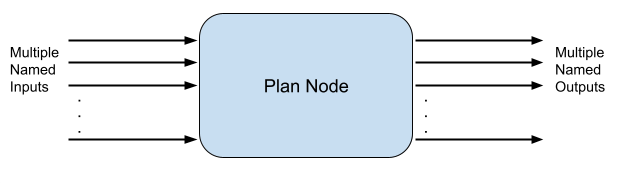
- a
sourcePlanNode: the name of another node - a
sourceProperty: the name of the output we want in the other node
- an
outputKey: the name of the output to get from the node. Used when a Node can return multiple, distinct outputs. - an
outputName: the name by which other nodes can call this output
- The root node requires one input. This input is from the plan node missingDataManager and has the name currentOuput.
- The missingDataManager node exists, and it returns one output called currentOuput: the dependency is correct, root depends on missingDataManager. missingDataManager will be executed before root.
- Start from the root.
- Resolve the node dependencies.
- The node dependencies can in turn have dependencies to be resolved. Repeat 2, recursively.
- Stop when all node dependencies are resolved.
AnomalyDetector of type "PERCENTAGE_CHANGE". It compares 2 inputs: a baseline table and a current table. See multiple inputs alerts.
Nodes behavior
Now that you know how the detection plan is built, let’s have a look at what’s happening.DataFetcher
The plan starts with theDataFetcher. Take the time to read the SQL query.
DataFetcher executes the given query and returns the result in the output named currentOutput.
Notice the usage of 2 functions:
__timeGrouptransforms a timecolumn in bins of a given granularity, in milliseconds. It makes it easy to group by a timecolumn with a specific granularity. In our example, it transforms the column to bins of 1 day. If we ever want to monitor per hour, we can just changemonitoringGranularitytoP1H.__timeFilteris a time range filter. Start and end dates are automatically generated depending on the detection runtime. Refer to the macro documentation.
TimeIndexFiller
After data is fetched, it is consumed by theTimeIndexFiller:
TimeIndexFiller takes care of this kind of problem.
Notice there is no parameter for this node.
This is because macros used by the DataFecher add metadata to result, (granularity, time column, etc…). TimeIndexFiller uses this metadata to know how to fill missing points.
If you don’t want to use macros, you can still configure the TimeIndexFiller manually.
AnomalyDetector
The data finally flows to theAnomalyDetector node.
AnomalyDetector is of type "THRESHOLD". There are many other types of detector, such as PERCENTAGE_CHANGE, HOLT_WINTERS, and so on. Parameters prefixed by component.* are specific to the detector execution. component.timestamp and component.metric tell the detector the column names of the time and the metric. See the documentation for Anomaly detection algorithms to learn more. Notice that there is no output. Anomaly detectors do output anomalies data, but this data is directly consumed by ThirdEye.
Metadata
This part contains metadata that helps ThirdEye make sense of your alert pipeline. Metadata is used for anomaly filtering in the UI, RCA, and pipeline execution. ThirdEye is designed to give you maximum control over your queries and transformations, but this also means it is not always possible for ThirdEye to infer important information from the pipeline. The metadata fields allow you to explicitly set important metadata.metadata values are already used in nodes, so it is good practice putting them as template properties like in this example.
datasource
name
dataset
name
completenessDelay
PT1H). ThirdEye will only run detection on data that is complete. Default value is no delay. This is rarely the case in real life.
mutabilityPeriod
dimensions
rcaExcludedDimensions
dimensions and rcaExcludedDimensions arguments cannot be used at the same time.
metric
name
col1 or a derived metric expression 2*col1 - col2.
aggregationFunction
where
DataFetcher query, it is most of the time relevant to apply the same filtering for RCA. Notice that this field accepts AND browser=chrome instead of browser=chrome. This makes it easy to share custom filter clauses between DataFetcher queries and this field using a template property.
eventContext
types
sqlFilter
granularity
AnomalyDetector nodes, in ISO-8601 format. Consider a detection pipeline with a cron that runs every day at 3am. By default, the endTime of the detection pipeline will be 3am. This means the last 0am-3am data will be taken, and put in a day bucket, even though the day is not finished and the data for the day is not complete. This can be avoided by passing a granularity of 1 day (P1D). ThirdEye will not take the 0am-3am because it is not a complete day. With granularity, ThirdEye only runs detection for periods that are complete. This can be combined with the completenessDelay parameter.
timezone
UTC.
The timezone is used:
- To apply
completenessDelayandgranularity - By the DataFetcher macros
__timeGroupand__timeFilter. - By the TimeIndexFiller
- By the AnomalyDetectors, to compute the right boundary of a top-right anomaly
- To merge anomalies
Metadata fields are not mandatory. You can start without metadata and update the alert configuration later if you need RCA. RCA is available as soon as the metadata fields are set.